
What Is App and Digital Solution Design? Why Multiple Tools Still Don't Add Up to One System
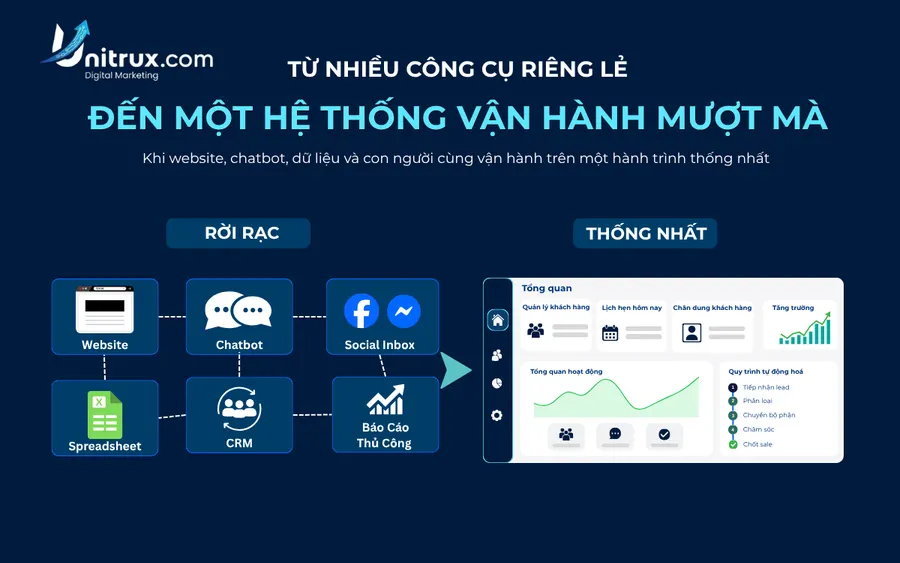
Many businesses today run several tools at once: customers leave their information on a website, staff pick up requests through Facebook or Zalo, that data gets re-entered into Google Sheets, the sales team tracks customers in a separate file, and monthly reports are still pieced together by hand.
Looked at individually, each piece seems to work fine. But once you follow the full customer journey end to end, problems start to surface: duplicate data, customers waiting too long, no easy way to track progress, and no clear answer to where exactly customers are dropping off.
This is the situation where app and digital solution design usually comes up — not as a technology trend, but as a way of reorganizing a process so that data, people, and tools operate on one unified system.
Why do businesses end up with many tools but still no real system?
A beautiful website doesn't necessarily generate customers if visitors don't know what to do next. A fast-replying chatbot doesn't necessarily improve close rates if product data, pricing, and policies haven't been standardized. An app with many features doesn't necessarily get used if the steps are too complicated or don't match how staff actually work.
The issue is usually not a lack of tools — it's that the tools are operating separately, not serving one unified journey.
For example, a customer trying to book a service might go through several steps:
- Search on Google.
- Visit the website.
- Read the price list.
- Message to ask about availability.
- Wait for staff to confirm.
- Provide their name and phone number again.
- Wait once more to finalize the appointment.
Every extra step is a point where the customer might drop off.
In e-commerce, Baymard Institute — an independent UX and online shopping behavior research firm — aggregates data from roughly 49–50 studies and reports a global average cart abandonment rate of around 70% (the latest figure: 70.22%). This number doesn't apply directly to every type of app, but it reflects a general principle: users can walk away even after clearly showing intent, simply because the completion journey wasn't convenient enough.
What does app and digital solution design actually include?
App and digital solution design is the process of researching, designing, and developing a technology system to solve a specific operational problem. Depending on the need, a solution can take many forms:
- Booking apps for spas, salons, dental clinics, or training centers.
- Customer management and transaction history apps.
- Web apps for managing orders, staff, or internal work.
- CRM systems for tracking leads and sales opportunities.
- Portals for customers, agents, or partners.
- Systems connecting a website, chatbot, ads, and the sales team.
- Automated workflows for capturing, sorting, and routing data.
- Dashboards that consolidate data from multiple sources.
- An MVP to test an idea before investing in a larger system.
The common trait of effective solutions is that they're designed around the process that's actually happening in the business, rather than forcing the process to change completely to fit an off-the-shelf piece of software.
Signs that the current process is hitting its limits
A few situations tend to show up before a business starts considering a digital solution.
Customers don't know the next step
Users visit the website, browse services, or send a message, but aren't sure how to book, request a quote, or reach the right department. The cause is often an unclear CTA, an overly long form, inconsistent information, or a confirmation process with too many steps.
Staff have to enter the same data multiple times
Customer information gets copied from a message into a spreadsheet, then entered again into sales software or a report. This wastes time and creates room for errors, missing data, and confusion over who handled what.
Data is scattered across many places
Marketing tracks ads on one platform, sales manages customers in a separate file, operations uses another system entirely. Without a shared customer ID or a syncing mechanism, basic questions often don't have clear answers:
- Where did this customer come from?
- Which channel produces the right leads?
- Where is a lead currently stuck?
- Who's responsible for handling it?
- How many leads have turned into appointments or orders?
The process depends on one person
Only one person knows how to run the file, handle requests, or compile the reports. When that person takes leave or leaves the company, the process breaks down — a sign that the data and process were never actually standardized.
Growth outpaces the way things are managed
A process might run fine at 20 requests a day but start to break down at 100–200 requests a day, because manual handling doesn't scale at the same rate.
Why do many app projects fall short of expectations?
A project can finish on time and still fail to deliver the business results it was meant to. Five causes tend to repeat.
1. Starting with a feature list instead of a specific problem
A long list — login, notifications, points, chatbot, maps, reports — gets drawn up before the priority problem has been clearly defined. The usual result: costs rise, timelines stretch, and the most important feature still doesn't get built well enough.
2. Unclear project scope
Two sides can easily end up with different understandings of the same project if the following aren't documented from the start:
- Number of screens.
- Number of user roles.
- Scope of admin functions.
- Number of systems to integrate with.
- Data that needs to be entered initially.
- Number of revision rounds.
- Who's responsible for content review.
- Ownership of source code and accounts.
3. Designing based on assumptions instead of real behavior
A great-looking interface in a presentation doesn't necessarily hold up in real use. Staff may need too many steps to complete a task, customers may not understand feature names, or managers may receive reports that lack the information they need to make decisions.
4. No baseline data for comparison
If you don't know how long it currently takes to process a request, or what percentage of forms get completed, it's very hard to judge whether a new system is actually an improvement. Baseline data needs to be captured before development starts, not after the system is already live.
5. No one owns operations after handover
The app launches, and then no one checks the data, updates content, or tracks user behavior. Technology doesn't produce results on its own — a system still needs an owner, a clear standard operating procedure (SOP), and a regular review cycle.
MVP — starting from a minimum viable version
Instead of building the entire system from day one, a common approach is to start with an MVP (Minimum Viable Product) — a version focused only on what's necessary to:
- Address the priority bottleneck.
- Test real demand.
- Collect user data.
- Catch problems before scaling.
- Avoid investing in features that aren't needed yet.
An MVP doesn't mean a bare-bones product. For example, an early-stage booking app might only need:
- A list of services.
- Available time slots.
- Location information.
- Appointment creation and confirmation.
- Notifications for customers.
- A schedule management screen for staff.
- A report on the number of bookings.
Features like loyalty points, referrals, membership, AI advisory, or multi-branch connectivity are usually saved for a later stage, once there's enough data to prove the demand.
What does a typical digital solution design process look like?
1. Assessing goals and the current process
The first step is usually understanding business goals, who will use the system, how the current process actually runs, which steps are wasting time or losing customers, where data currently lives, and any mandatory requirements around security, permissions, and reporting. At this stage, a problem can sometimes be solved just by fixing a process or connecting existing tools — not every case requires building a brand-new app.
2. Building the journey map
The process gets broken down into concrete steps, for example:
Ad → Landing page → Sign-up form → CRM → Assigned staff → Appointment → Consultation outcome → Report
Each step needs to define:
- Who performs it?
- What data gets generated?
- Where does that data go next?
- What's the condition for moving to the next step?
- How are exceptions handled?
- What metrics need to be tracked?
3. Defining MVP scope
Features are usually sorted into four tiers: must-have, should-have, could-have-later, and not needed yet. This classification helps control budget and keeps the project from turning into a feature list with no end point.
4. Wireframing and UX/UI design
A wireframe defines the screen structure, the flow of interactions, and the content that needs to be shown before the UI is finalized. Reviewing a clickable prototype usually helps catch issues early, such as:
- Action buttons that are hard to notice.
- A sign-up process that's too long.
- Content that's not easy to understand.
- Missing confirmation states.
- Unclear user roles.
- Admin screens that lack necessary information.
5. Developing in sprints
Breaking the project into small sprints — each with its own scope, owner, completion criteria, test cases, and acceptance results — makes it possible to see real progress instead of only seeing the product near the end of the project.
6. Testing before launch
A system is usually tested against a range of scenarios:
- Users entering incomplete or incorrect data.
- Slow or dropped network connections.
- Two users acting at the same time.
- Users without the right access permissions.
- Payment or integration failures.
- Duplicate data.
- Notifications that fail to send.
- Customers dropping off mid-process.
Beyond functional testing, load speed is also worth measuring. In its "The Need for Mobile Speed" research, Google found that 53% of mobile visits can be abandoned if a page takes more than three seconds to load.
Speed isn't just a technical metric. In an official A/B test published by Google on web.dev, Vodafone (Italy) found that a 31% improvement in LCP (Largest Contentful Paint) was accompanied by an 8% increase in sales, along with a 15% improvement in lead-to-visit rate and an 11% improvement in cart-to-visit rate. This is the result of one specific case, not a guaranteed uplift for every website — but it shows that technical performance can directly affect business behavior.
7. Launch, handover, and monitoring
Handover documentation usually includes:
- Source code and repository information.
- Design files.
- Admin accounts.
- Domain and hosting details.
- Apple, Google, or related service accounts.
- Database structure.
- API documentation.
- User guides.
- A testing checklist.
- A list of access permissions.
- Backup procedures.
- Warranty and maintenance scope.
Which assets belong to the business and which accounts remain under the vendor's management is typically documented in the handover record.
How do you measure the effectiveness of a digital solution?
Effectiveness usually isn't measured by the number of screens, the number of features, or simply having an app on the App Store and Google Play. Three layers of metrics are typically tracked in parallel.
Layer 1 — Implementation quality
- Percentage of completed scope items.
- Number of bugs by severity.
- Load speed.
- Session stability rate.
- Testing checklist completion rate.
- Percentage of documentation delivered.
- Number of access permissions still dependent on an external party.
- Bug resolution time.
Layer 2 — User behavior
- Sign-up completion rate.
- CTA click-through rate.
- Booking completion rate.
- Time to complete a task.
- Average number of steps per process.
- Return user rate.
- Drop-off rate by screen.
- Number of conversations that show real intent.
- Rate of staff following the correct process.
Layer 3 — Business outcomes
- Qualified leads.
- Successful appointments.
- Quotes sent.
- Lead-to-customer conversion rate.
- Cost per lead.
- Cost per customer.
- Revenue by source.
- Staff time saved.
- Reduction in manual data entry.
- Percentage of requests handled on time.
On the potential for automating work, the McKinsey Global Institute's July 2023 report, "Generative AI and the future of work in America," estimated that without generative AI, automation could take over work accounting for about 21.5% of hours worked in the US by 2030; with generative AI, that share was estimated to rise to about 29.5%. This is a technical-potential estimate for one specific market (the US), and it doesn't mean an entire process gets automated — steps that require judgment, communication, and exception handling still need people involved.
A before-and-after example of applying a digital solution
Before
- Customer messages the fan page.
- Staff ask for information again.
- Staff check the schedule using a file.
- Information gets re-entered into a spreadsheet.
- Customer waits for confirmation.
- Manager compiles the report at the end of the week.
This process can take 8–10 minutes to handle a single request, not counting the wait time between steps.
After
- Customer selects the service and time themselves.
- The system checks availability.
- Information is captured automatically.
- Staff receive a notification.
- Customer receives a confirmation.
- Reports update in real time.
In this scenario, the metric worth tracking usually isn't "we now have a booking app" — it's specific changes such as:
- How much has average processing time dropped?
- How much has repeated data entry decreased?
- How has the booking completion rate improved?
- Can you now identify the source behind each appointment?
Do small businesses need to build their own app right from the start?
Not every case needs iOS and Android apps built from day one. Depending on the need, common starting options include:
- A landing page paired with a smart form.
- A web app used directly on a phone.
- A simple CRM.
- Standardized, automated Google Sheets.
- A chatbot connected to data.
- An operations dashboard.
- An MVP built for a specific customer segment or a single location.
A dedicated app usually makes more sense when there's repeat usage, a distinctive process, a large enough user base, or a need for features that a regular website struggles to deliver. The deciding factor is usually choosing a solution that's just enough for the current stage, while still being able to scale later.
Frequently asked questions
What determines the cost of app and digital solution design?
Cost usually depends on the number of user roles, features, screens, platforms, level of customization, number of systems to integrate with, security requirements, and the scope of the handover. A simple booking app has a very different scope from a multi-branch management system with multiple permission levels and connections to a CRM, payment gateway, or accounting software.
How long does it take to develop an app?
Timeline depends on complexity and how quickly stakeholders respond. An MVP with a clear scope is usually delivered faster than a multi-role, multi-integration system. A realistic timeline needs to include research, design, review, development, testing, and launch preparation — not just coding time.
Do you need to develop iOS and Android at the same time?
Not always. You can start with a web app or a single priority platform, depending on which devices your customers and staff actually use. This decision is usually better based on real user behavior data than on the desire to be present on every platform at once.
Who should own the source code when outsourcing app development?
Ownership of source code, design files, accounts, and data should be clearly stated in the proposal and the handover record before the project starts, to avoid a business becoming dependent on a third party just to operate or modify the system later.
How soon can you evaluate the effectiveness of a digital solution?
Technical metrics — speed, bugs, processing time, and data-capture capability — can usually be checked right after launch. Business metrics like conversion rate, customer acquisition cost, or revenue need enough time and data to compare against a baseline — how long that takes depends on user traffic, sales cycle length, and how the operation actually runs.
Start from a specific problem, not a feature list
An effective digital solution isn't necessarily the biggest system or the one with the most features. The right solution is usually the one that can answer four questions:
- What's the priority problem to solve?
- What action should be easier for users to take?
- What data needs to be captured?
- What outcome proves the project is creating real value?
In app and digital solution design, several teams in Vietnam — including Unitrux — take an approach that starts with process discovery, defining MVP scope, and measuring with real data, rather than rolling out a fixed feature list from the start. This is one of many approaches a business can consider when exploring how to build a digital solution that fits its current scale and stage.
Đội ngũ Unitrux · Nội dung được biên tập theo tiêu chuẩn nội dung hữu ích và đáng tin cậy của Unitrux.